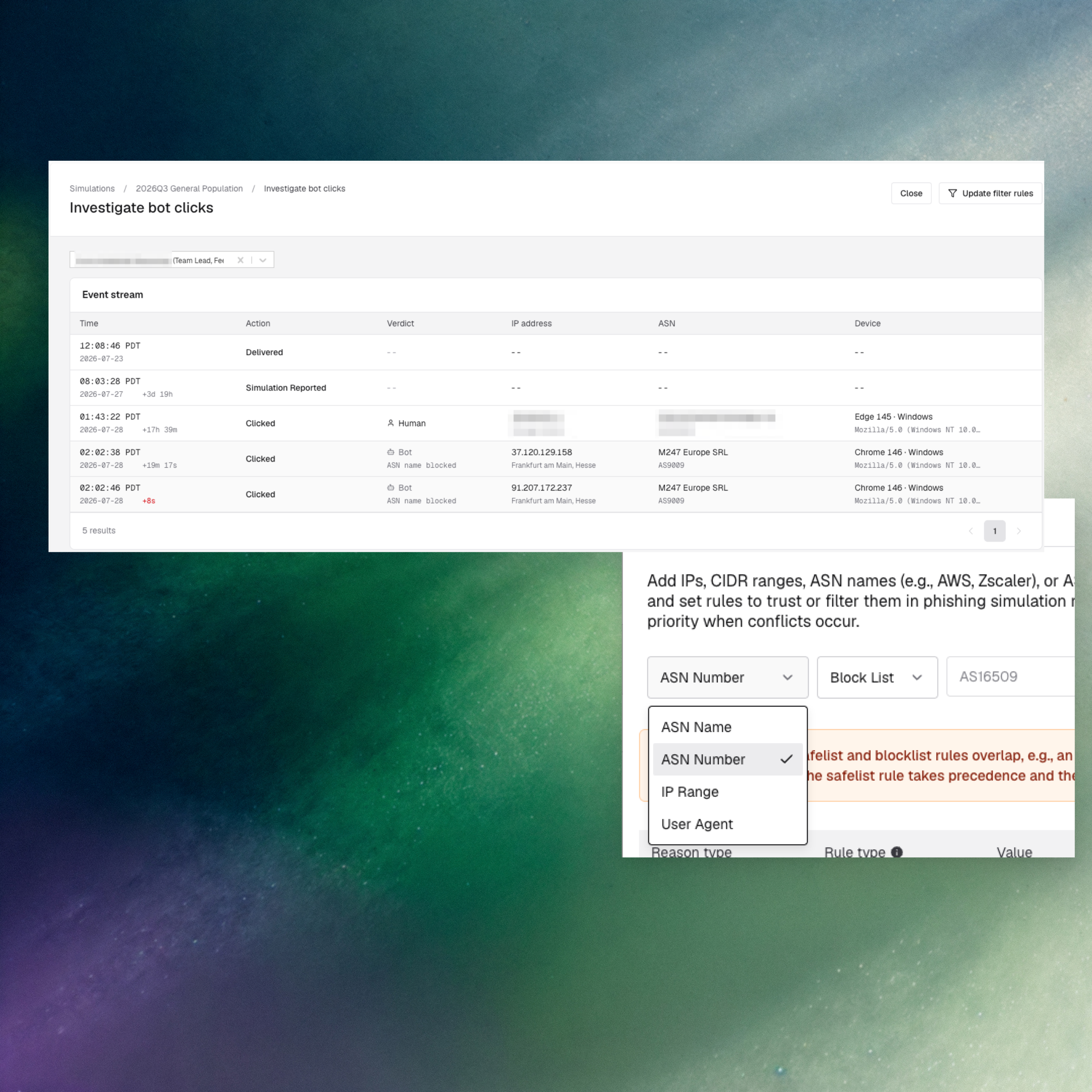
When an employee disputes a phishing simulation result, security teams used to have one option: export raw data and reconstruct what happened by hand. Fable now surfaces event-level detail such as clicks, timestamps, IPs, ASNs, and verdicts directly in the reporting view, plus ASN-based filtering to strip known scanner and bot traffic before it hits reports.
What’s new
-
Bot click investigation view — Open any simulation and see a full event stream of every recorded interaction: time, action, verdict, IP address, ASN, and device. Update filter rules directly from the same view without leaving reporting.
-
ASN-based filtering — Admins can add Autonomous System Numbers (or ASN names like AWS, Zscaler), IP ranges, CIDR blocks, and user agents to the global bot filter, with rules to trust or block. Precedence between safelist and blocklist is clearly enforced when rules conflict.
Why it matters
Phishing simulation programs live and die on the accuracy of their click data, and that data is only as good as the trail behind it. When bot and scanner traffic gets counted as employee activity, click rates get distorted and the risk narrative falls apart and employees flagged as repeat offenders often turn out to be careful users checking links in tools like VirusTotal before clicking. Fable’s event stream and ASN-based filtering close both gaps: the numbers stay clean before they hit a report, and security teams can see the actual behavior behind every flagged event.
This is built for the analysts and admins who own simulation reporting and get pulled into disputes when an employee pushes back on a “failed” result. Every dispute that used to mean a raw data export and manual reconstruction now resolves inside the same reporting view.
How to access it:
Command Center > Simulations > Bot filter settings for global rules. Simulations > Reporting > Investigate bot clicks for the event stream.