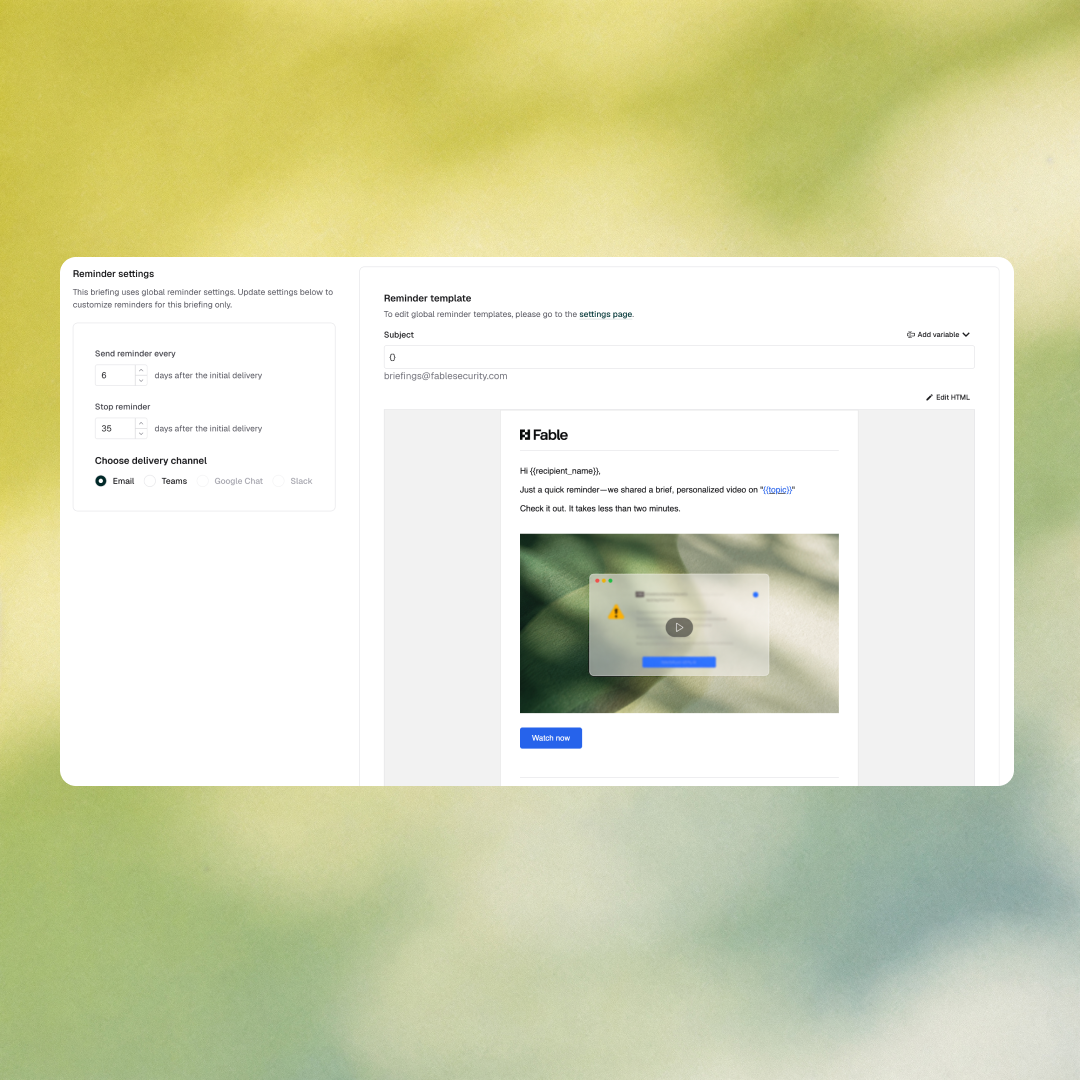
Control how and when training reminders reach employees — down to cadence, channel, and template.
Two updates give security teams more control over training delivery. Delivery reminders are now configurable per campaign — custom end dates, cadence, and channel, with a live preview before anything sends. Organizations can also set a default email template for awareness training org-wide, so every communication reflects your brand from the start.
What’s new
- Per-campaign delivery reminders — configure custom end dates, cadence, and frequency for each campaign’s reminder settings from a new UI, with a live preview of how reminders will appear across delivery channels
- Customizable default course email templates — set your organization’s default email template for awareness training under Settings > Awareness Trainings
Why it matters
Completion rates are the metric boards understand. Generic reminder schedules and out-of-the-box email templates are the fastest way to depress them — employees tune out messages that feel automated or off-brand. Per-campaign reminder control is one of the most direct levers available for moving that number.
The default course template setting means every new campaign inherits your organization’s communication standards automatically — not the platform’s defaults. No engineering support required for either change.
How to access it: Access delivery reminder settings in your campaign setup. Set default course email templates under Settings > Awareness Trainings.
 coming up