
TL;DR—
- Over a US holiday weekend, attackers sent out urgent LastPass-themed “backup recommended” phishing emails from “mail-lastpass[.]com” to trick victims into revealing their master passwords.
- Per the latest reports, LastPass itself was NOT compromised and did not leak customer data or credentials.
- This particular phishing lure combines many effective phishing tactics, such as timing, urgency, and security-specific reassurances.
- To avoid falling for this and similar phishing attacks, NEVER click, download, or reply to suspicious emails and reach out to the “last known good” contact information.
- Check out “One ish, two ish: How to prevent modern phishing” for more about modern phishing lures and other social engineering attacks.
The MLK “Backup Required” LastPass phishing email
Password manager vendor LastPass received reports that over the weekend of January 19, 2026, attackers sent branded phishing emails to LastPass customers, pretending that an important “recommended backup” needed to happen within the next 24 hours.
On clicking the link, victims were taken to a realistic—but fake—login page for LastPass, where they were prompted to enter their master password.
With both their email and the master password—and assuming multifactor authentication (MFA) wasn’t set up—an attacker then gains access to the victim’s entire LastPass vault, which could include:
- Any stored credentials to inboxes, bank accounts, and even work accounts—just like the Disney-Slack data breach in 2023
- Important documents, such as government ID cards or passports
- Passkeys and saved authentication methods
Why the LastPass phishing lure works
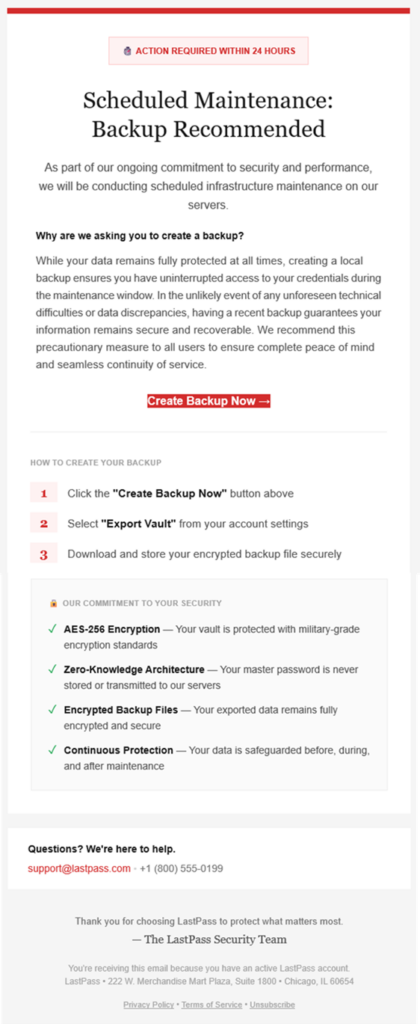
(courtesy of LastPass)
This phishing lure features many extremely effective social engineering tactics, including:
- Send timing: Attackers sent these lures on a US holiday weekend—right before Martin Luther King, Jr. Day—when victims are distracted and security teams typically understaffed.
- Language choice:
- Notice the red alert box at the very top, as well as additional urgency triggers—specifically the “action required” within a short time period. The urgency started even before the email was opened, with subject lines like:
- LastPass Infrastructure Update: Secure Your Vault Now
- Protect Your Passwords: Backup Your Vault (24-Hour Window)
- Important: LastPass Maintenance & Your Vault Security
- Throughout the email’s written message, attackers repeated security-specific reassurances—“ongoing commitment to security”, the “ongoing commitment to security” checklist—to mask malicious intent.
- Notice the red alert box at the very top, as well as additional urgency triggers—specifically the “action required” within a short time period. The urgency started even before the email was opened, with subject lines like:
- Plausible packaging:
- LastPass is a respected and personally important brand for its victims, increasing the chance they click the email.
- The sender domain “sounds right” at first glance, from “mail-lastpass[.]com”.
How to avoid getting hooked by the MLK LastPass lure and similar phishing messages
- DO NOT REPLY TO, DOWNLOAD, CLICK, OR CALL ANYTHING in a suspicious message!
- After all, if the email is real, you can always come back to it later!
- Confirm the message by reaching out to a known-good communication, like going to the sender’s website directly or sending a new email to customer support.
- In this case, you could open the LastPass application itself to see if there was a maintenance banner, as well as find legitimate contact information for their help desk to verify the message.
- Remember that no password manager company—or financial institution or any other store or vendor!—will ever ask for your password.
While this lure didn’t contain a direct ask for the password, many similar phishing emails—and voice phishing (“vishing”) or sms phishing (“smishing”)—will ask for either your authentication codes or the password to put in for you… but actually steal it.
If you’re curious about other types of phishing lures, check out Fable Security’s free ebook, “One ish, two ish: How to prevent modern phishing”—no email required!