

The TL;DR
- BYOD saves money and boosts morale, but can fragment security
- Laptops, tablets, and smartphones carry distinct risks
- People can inadvertently expose your network, applications, and data
- These hyper-targeted, precise interventions reduce exposure
Most organizations have a BYOD program. This saves money and makes employees happier, but it can also be risky. That’s because personal devices have fragmented security postures: outdated operating system software, unvetted apps, shared usage, and configurations that can open doors for attackers or human error.
When personal laptops and smartphones connect to your network, access corporate applications, and handle sensitive communications, they effectively become part of your security perimeter. You can protect these interactions through technical controls (like VPNs, MDM, and endpoint detection solutions). But ultimately, many settings and behaviors come down to the device owner. That’s where human risk management comes in: helping employees configure and use their devices in ways that reduce exposure.
Four common risk areas include device hygiene, access control, connectivity, and data handling. Here are some of the lapses we see in our human behavior data lake here at Fable Security, and some advice for addressing them in a targeted way.
Device hygiene
People aren’t always on top of their device hygiene—whether smartphones, tablets, or laptops. They delay OS updates, skip lock-screen protections, and forget to update anti-malware (or don’t have their anti-malware configured properly). That leaves exploitable vulnerabilities and weakens built-in security. Some jailbreak their smartphones, putting them at higher risk for malware. On laptops, people run unsupported operating systems and disable full-disk encryption, making them an easy target for attackers or exposing important data if the laptop is stolen.
Access control
Access controls on personal devices are often weaker than on company-issued ones. Employees reuse passwords across personal and work accounts, store corporate logins in unsecured browsers, and rely on weak PINs and easily bypassed biometrics. Saved credentials in mobile apps can also expose company systems if the device is lost or stolen. Without MFA enforced across accounts, attackers have an easy path in. The result is that an otherwise secure application can be compromised simply because the device is unsecured.
Connectivity
Connectivity habits are another weak link. Employees join public Wi-Fi networks in airports or cafés without a VPN, making them vulnerable to man-in-the-middle attacks. Smartphones paired with untrusted Bluetooth devices or personal hotspots can expose sensitive traffic. Unsecured laptop tethering creates similar risks. These are small conveniences for employees, but each one broadens the attack surface and can make corporate data easier to intercept.
Data handling
The line between personal and work data blurs quickly on BYOD devices. Auto-backups can push corporate files into personal iCloud or Google Drive accounts. Screenshots of sensitive information can land in smartphone photo galleries. Employees can save work documents to personal Dropbox accounts for convenience. These habits may feel harmless, but they erode the boundary between corporate and personal environments and can expose data.
The human risk playbook
No doubt you have policies for most or all of these eventualities, backed up with technical controls or paper processes. Whether you have a control in place or rely on a process, your human risk process can do four important things:
- Monitor how well your policies are being followed, and gain visibility into the cohorts of people who aren’t following them;
- Nudge or brief those who need a reminder of what your policies are, and how to adhere to them;
- Prompt people to adopt the proper tools (e.g., MDM, MFA, etc.) to ensure policies are followed through technical controls;
- When technical controls aren’t available, prompt people to adhere to policies through high-quality, targeted interventions.
Use data to your advantage
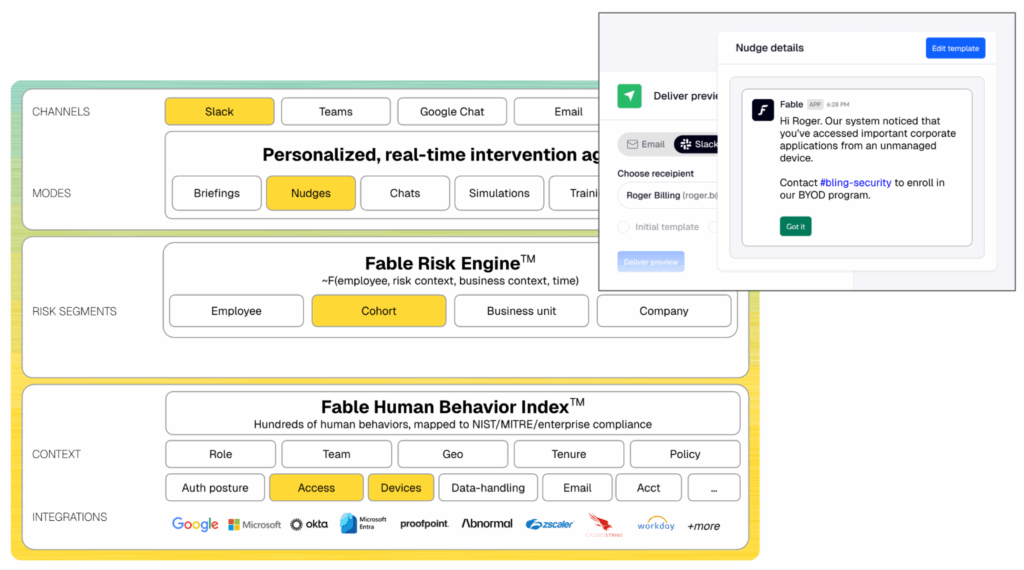
Your human risk playbook should involve gathering and synthesizing telemetry from your identity and access, workspace, HR, and security stack to understand behaviors and automatically create cohorts of employees whose devices are out of policy or who exhibit risky BYOD behavior.
Deploy hyper-targeted, precise interventions
From there, create targeted, policy-aligned, AI-generated interventions, such as a 30-word nudge in Slack or a 60-second personalized briefing video. The intervention should target only the people who need to take action, explain why, and offer a precise call-to-action. That could mean instructing people with out-of-date OS versions to update immediately, prompting those accessing sensitive corporate applications over unsecured Wi-Fi to use an approved VPN, or directing employees who are saving sensitive data to personal cloud storage to use the approved corporate-sanctioned cloud storage. By narrowing the scope and tailoring your calls-to-action, you not only reduce noise and fatigue but also maximize the likelihood that people will follow your BYOD policy.
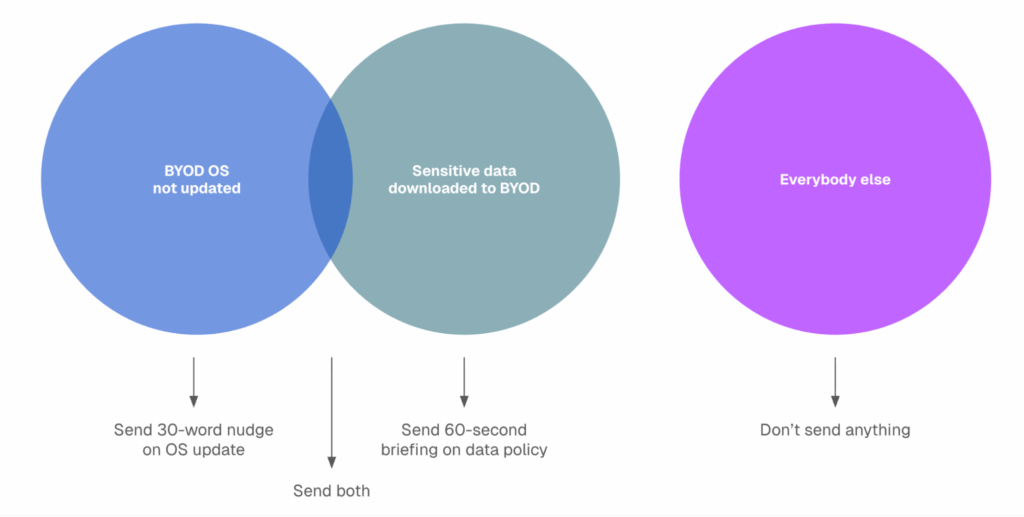
Your path forward on safe BYOD use includes modern human risk management. Your human risk platform should understand your areas of risk and policy non-compliance and deploy super-relevant, just-in-time interventions to help employees course-correct without blocking them from using their devices.