Fable announces our board-ready human risk reporting.

Fable Security product release: September 26, 2025

The TL;DR

  • Self-service SSO: Fast setup, simple login, strong security
  • Realistic phishing simulation: Add .docx attachments and filter bot clicks
  • Campaign efficiency: Preview, edit, and complete campaigns with ease

This release is about quality results and efficiency of use. The following is now live in your tenant. Here’s what’s new and how to get started.

Self-service SSO

Set up SAML SSO intuitively and let people authenticate with their directory and/or log into Fable with their email address. This makes for a fast setup, frictionless login, and strong security.

  • How it works: settings → integrations → SAML SSO. 
  • Limitations: Each tenant supports one SSO configuration.

Accurate phishing results

Stand behind your phishing results with confidence. We automatically clean up results by filtering bot clicks from simulation results, self-tune the system, and enable exceptions.

  • How it works: 
    • Filter bots: simulations → reporting → filter false positives → select IP range or ASN name from pull-down.  
  • Limitations: Currently limited to .docx attachments only; filtering depends on the accuracy of input signals.

Campaign efficiency

Manage campaigns faster and achieve more customization with briefing template updates, campaign previews, campaign-level editing, the ability to upload employee names pre-integration; and the ability to mark campaigns as complete.

  • How it works: 
    • Preview campaign: AI templates → click into a campaign → preview → select multiple preview recipients. 
    • Edit at campaign level: Command center → click into a campaign → templates → click to edit for campaign-level emails without changing global defaults. 
    • Upload employee names: 
    • Mark complete: Command center → ellipses next to campaign → mark campaign as complete.
  • Limitations: Previews capped at 10 recipients; marking a campaign complete is irreversible.

Cybersecurity quiz

Test employees’ cybersecurity awareness and ability to detect deepfakes with a 10-question quiz.

  • How it works:
    • Awareness training → active trainings → select Cybersecurity Awareness Month.
    • ALSO available decoupled from the Fable platform for use by non-customers or customers pre-integration.
  • Limitations: Reach out to Fable for help customizing deepfakes.

Your human risk playbook for BYOD

The TL;DR

  • BYOD saves money and boosts morale, but can fragment security
  • Laptops, tablets, and smartphones carry distinct risks
  • People can inadvertently expose your network, applications, and data
  • These hyper-targeted, precise interventions reduce exposure

Most organizations have a BYOD program. This saves money and makes employees happier, but it can also be risky. That’s because personal devices have fragmented security postures: outdated operating system software, unvetted apps, shared usage, and configurations that can open doors for attackers or human error.

When personal laptops and smartphones connect to your network, access corporate applications, and handle sensitive communications, they effectively become part of your security perimeter. You can protect these interactions through technical controls (like VPNs, MDM, and endpoint detection solutions). But ultimately, many settings and behaviors come down to the device owner. That’s where human risk management comes in: helping employees configure and use their devices in ways that reduce exposure.

Four common risk areas include device hygiene, access control, connectivity, and data handling. Here are some of the lapses we see in our human behavior data lake here at Fable Security, and some advice for addressing them in a targeted way.

Device hygiene

People aren’t always on top of their device hygiene—whether smartphones, tablets, or laptops. They delay OS updates, skip lock-screen protections, and forget to update anti-malware (or don’t have their anti-malware configured properly). That leaves exploitable vulnerabilities and weakens built-in security. Some jailbreak their smartphones, putting them at higher risk for malware. On laptops, people run unsupported operating systems and disable full-disk encryption, making them an easy target for attackers or exposing important data if the laptop is stolen.

Access control

Access controls on personal devices are often weaker than on company-issued ones. Employees reuse passwords across personal and work accounts, store corporate logins in unsecured browsers, and rely on weak PINs and easily bypassed biometrics. Saved credentials in mobile apps can also expose company systems if the device is lost or stolen. Without MFA enforced across accounts, attackers have an easy path in. The result is that an otherwise secure application can be compromised simply because the device is unsecured.

Connectivity

Connectivity habits are another weak link. Employees join public Wi-Fi networks in airports or cafés without a VPN, making them vulnerable to man-in-the-middle attacks. Smartphones paired with untrusted Bluetooth devices or personal hotspots can expose sensitive traffic. Unsecured laptop tethering creates similar risks. These are small conveniences for employees, but each one broadens the attack surface and can make corporate data easier to intercept.

Data handling

The line between personal and work data blurs quickly on BYOD devices. Auto-backups can push corporate files into personal iCloud or Google Drive accounts. Screenshots of sensitive information can land in smartphone photo galleries. Employees can save work documents to personal Dropbox accounts for convenience. These habits may feel harmless, but they erode the boundary between corporate and personal environments and can expose data.

The human risk playbook
No doubt you have policies for most or all of these eventualities, backed up with technical controls or paper processes. Whether you have a control in place or rely on a process, your human risk process can do four important things:

  1. Monitor how well your policies are being followed, and gain visibility into the cohorts of people who aren’t following them;
  2. Nudge or brief those who need a reminder of what your policies are, and how to adhere to them;
  3. Prompt people to adopt the proper tools (e.g., MDM, MFA, etc.) to ensure policies are followed through technical controls;
  4. When technical controls aren’t available, prompt people to adhere to policies through high-quality, targeted interventions.   

Use data to your advantage

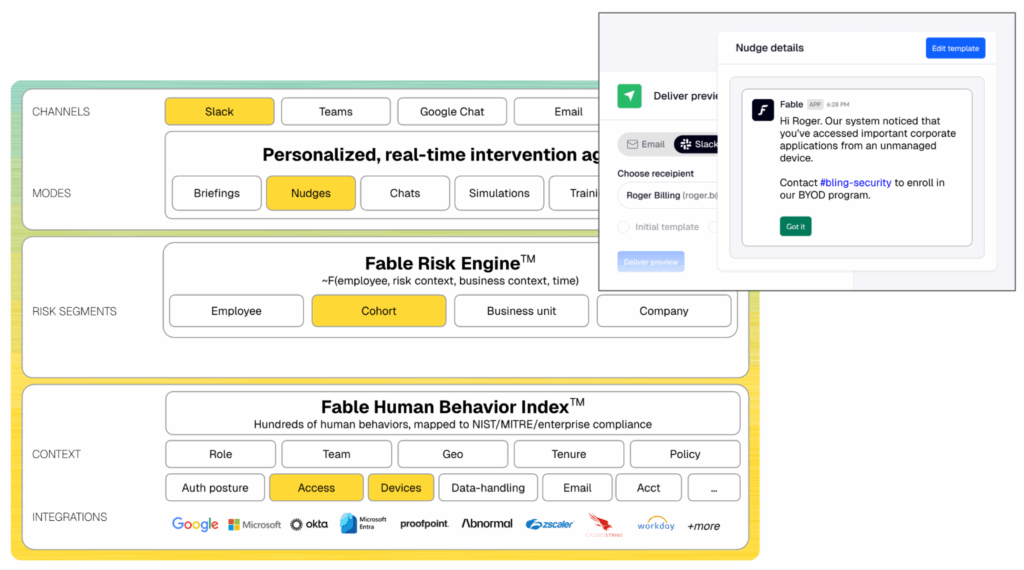
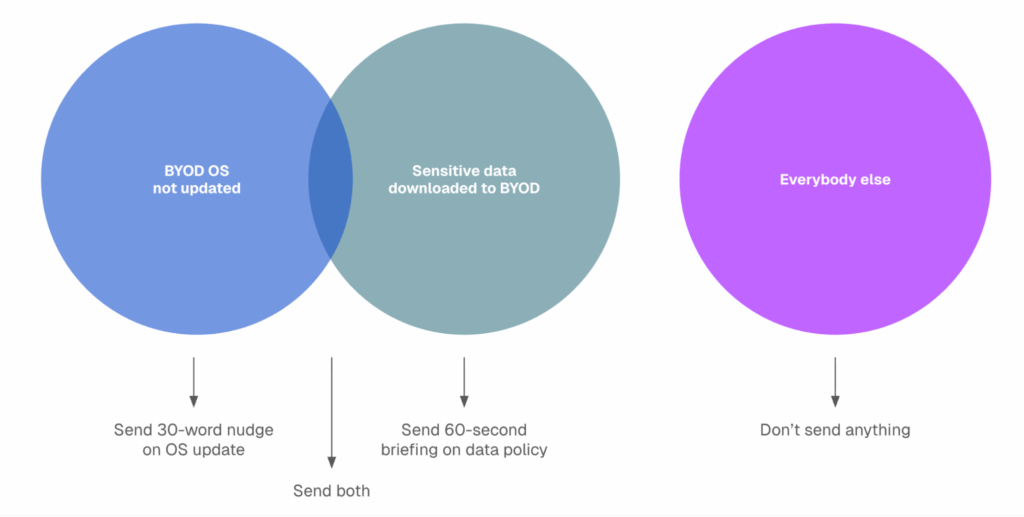
Your human risk playbook should involve gathering and synthesizing telemetry from your identity and access, workspace, HR, and security stack to understand behaviors and automatically create cohorts of employees whose devices are out of policy or who exhibit risky BYOD behavior. 

Deploy hyper-targeted, precise interventions

From there, create targeted, policy-aligned, AI-generated interventions, such as a 30-word nudge in Slack or a 60-second personalized briefing video. The intervention should target only the people who need to take action, explain why, and offer a precise call-to-action. That could mean instructing people with out-of-date OS versions to update immediately, prompting those accessing sensitive corporate applications over unsecured Wi-Fi to use an approved VPN, or directing employees who are saving sensitive data to personal cloud storage to use the approved corporate-sanctioned cloud storage. By narrowing the scope and tailoring your calls-to-action, you not only reduce noise and fatigue but also maximize the likelihood that people will follow your BYOD policy.

Your path forward on safe BYOD use includes modern human risk management. Your human risk platform should understand your areas of risk and policy non-compliance and deploy super-relevant, just-in-time interventions to help employees course-correct without blocking them from using their devices.

Your human risk playbook for secure generative AI use

The TL;DR

  • Generative AI tools boost productivity, but can leak data
  • The risk can come from employees pasting code, uploading IP, sharing non-public financials, etc.
  • A human behavior data lakehouse can reveal hidden patterns pointing to these risks
  • You can use just-in-time interventions like super-short nudges and briefings to shape behavior
  • Here’s a sample of what you might find in the Fable platform

Enterprises are adopting generative AI in a big way. People are using tools like ChatGPT, Gemini, and Claude to speed up coding, polish marketing copy, summarize contracts, and brainstorm ideas. The productivity upside is real, but so are the risks—exposed customer data, source code, intellectual property, non-public financials, protected health information, and more can end up in places you never intended. Unlike traditional cyber threats, these exposures don’t come from an external attacker; they come from everyday employees moving too fast, and maybe not realizing the consequences.

The only way to deal with this risk is to see it clearly. A human behavior data lakehouse like ours ingests signals from your workspace and security stack, normalizes them, and identifies patterns. While your security team may be able to surface some issues from individual tools, they won’t have an easy way to see the behavior across the board, and more importantly, won’t be empowered to intervene—making employees aware and suggesting alternative ways to get their jobs done—while also protecting your sensitive data.

Here are a few examples of what we see in the Fable platform:

IAM (Okta, Azure AD) → who’s adopting and provisioning access to AI

EDR (CrowdStrike, SentinelOne) → endpoint activity such as copy-paste

DLP (Microsoft Purview, Netskope) → sensitive data categorizations

SASE (Netskope, Zscaler) → sensitive data uploads to AI

To name a few.

Beyond simply telling you who’s doing what, a human behavior data lakehouse can connect more dots to give you context, such as people’s role, access, and behavior history, so you know where your risk is most acute and where to concentrate your interventions. 

Once you’ve identified the most problematic data-sharing behaviors in your enterprise, you’ll want to take action in the moment using an automated, AI-generated intervention. That may be a quick-and-dirty nudge in Slack or Teams, or a personalized 60-ish-second video briefing referencing the person, their precise behavior, your company’s policy, whatever sanctioned applications you want to guide them to, and any specific calls-to-action you want to make.

Here’s an example of what such an intervention might look like—a free video you can download and use in your company. It’ll give you a taste of our short-and-sweet, highly-effective, AI-generated content. As part of the Fable platform, it would be personalized, targeted, and sent just in time.

Want a briefing tailored to your organization’s tools? Schedule a short demo with us. 

Fable Security product release: September 12, 2025

The TL;DR

  • Cohort builder: Create cohorts instantly from employee attributes
  • Campaign impact markers: See campaign deliveries on cohort trend charts

This release is about targeting precision and connecting campaigns to outcomes. The following is now live in your tenant. Here’s what’s new and how to get started.

Cohort builder

Create targeted cohorts instantly using employee attributes like department, job title, or affinity group from either your directory or search terms.

  • How it works: cohorts → create cohort from employee attributes → select department from your directory or from a job title keyword. 
  • Limitations: Supports only department and job title attributes. Matching is text-based. “New” tag disappears after 48 hours.

Campaign impact markers

Visualize campaign impact by seeing intervention delivery dates overlaid on cohort trend charts.

  • How it works: human risk engine → cohort → see trend graph with markers on dates when campaigns are delivered, including reminders. Hover to see campaign details.
  • Limitations: Applies to briefing campaigns only. Cohort must be explicitly included in the campaign target. Markers are informational only.

On-demand webinar: the Fable human behavior data lakehouse

We just released the Fable human behavior data lake. It’s the foundational element, empowering security teams with accurate, explainable, AI-assisted risk calculation and analysis.

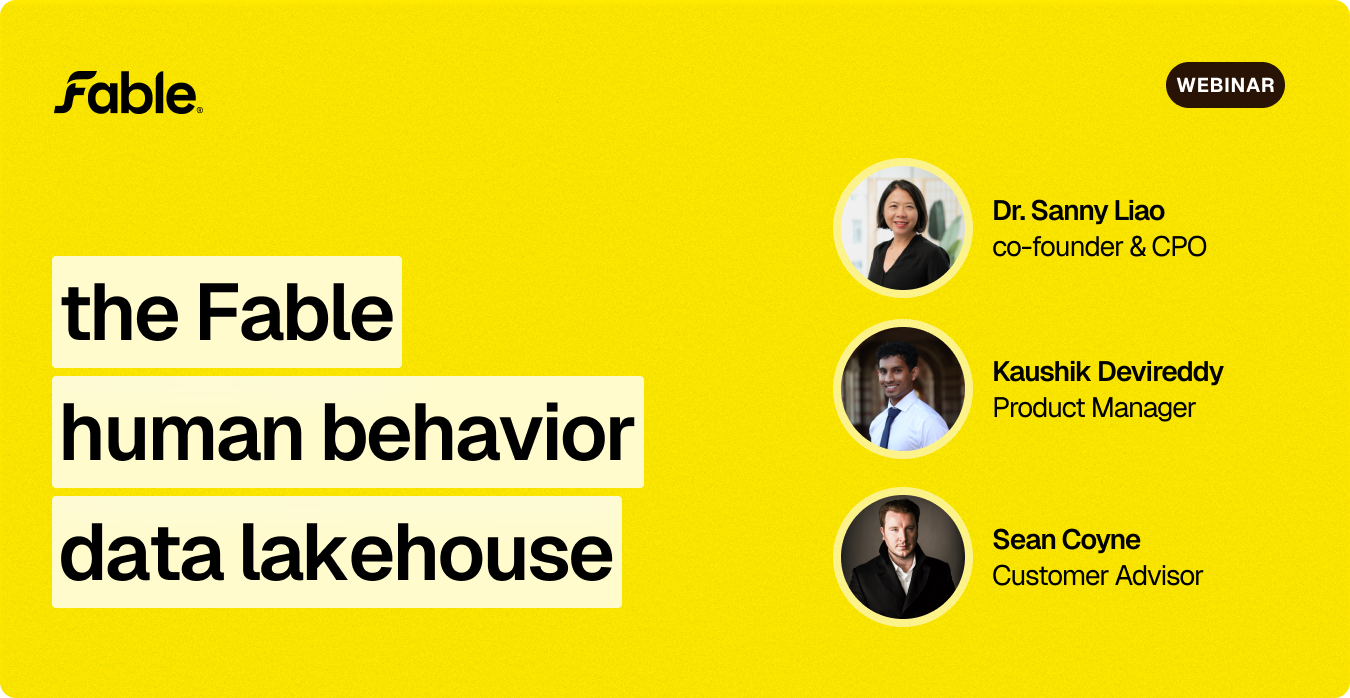
Watch this on-demand webinar with Dr. Sanny Liao, co-founder & CPO, Kaushik Devireddy, product manager, and Sean Coyne, customer advisor for a 15-minute* explainer and demo on what we built.

* Yes, it’s only 15 minutes. We removed all the webinar nonsense, so you can get in and get out with just what you need.

These 7 human risk use cases require a data lakehouse

The TL;DR

  • Legacy tools are based on static rules and rules-based detections
  • Fable’s human behavior data lakehouse unlocks powerful, real-time capabilities
  • A data lakehouse enables critical, first-time use cases for enterprises, including:
    • Dynamic risk scoring
    • Early threat detection
    • Automated policy enforcement
  • Register for our 15-minute webinar on 9/4 at 10 am PT to learn more

When we set out to build the Fable human behavior data lakehouse, we weren’t just thinking about storing information. We were thinking about unlocking entirely new capabilities—ones that legacy systems simply can’t handle.

Here are seven human risk use cases that are only possible with a flexible lakehouse architecture, so data can be available in a variety of formats, including enriched, contextual, and intelligent.

1. Calculate employee risk dynamically

Most platforms score risk based on static rules: “Did John Smith pass or fail our phishing simulation?” But real-world risk is more complex. With a data lakehouse, ingest raw signals from across the enterprise—identity systems, endpoints, workspaces, HR systems, and more—and calculate a contextual risk score that updates dynamically as new data flows in.

2. See emerging threats early

Point solutions often miss nuanced employee behaviors that don’t fit a pre-defined rule and may occur across multiple enterprise touchpoints. For example, if someone with elevated Salesforce access also installs an unsanctioned remote support application, has browsed to malicious URLs, and hasn’t seen the briefing on vishing (all key indicators of a ShinyHunters attack), that combination may indicate trouble. A data lakehouse lets you correlate these signals and flag new risk patterns you haven’t seen before.

3. Identify risky, but business-critical employees

Not all risky users are created equal. With a flexible data model, you can layer in business metadata to distinguish between, say, a contractor with weak MFA accessing Snowflake and a senior engineer in the same system. A data lakehouse makes it possible to prioritize based on actual business exposure, not just technical signals.

4. Personalize interventions at scale

Generic nudges and training don’t cut it. A data lakehouse lets you assemble a full picture of each user—their role, access, team, geography, company tenure, authentication hygiene, data-handling history, credential exposure, phishing simulation performance, and more—and use that context to deliver highly personalized, AI-generated interventions that actually land. That might mean a nudge, a video briefing, or even a live workflow—precisely when and where it matters.

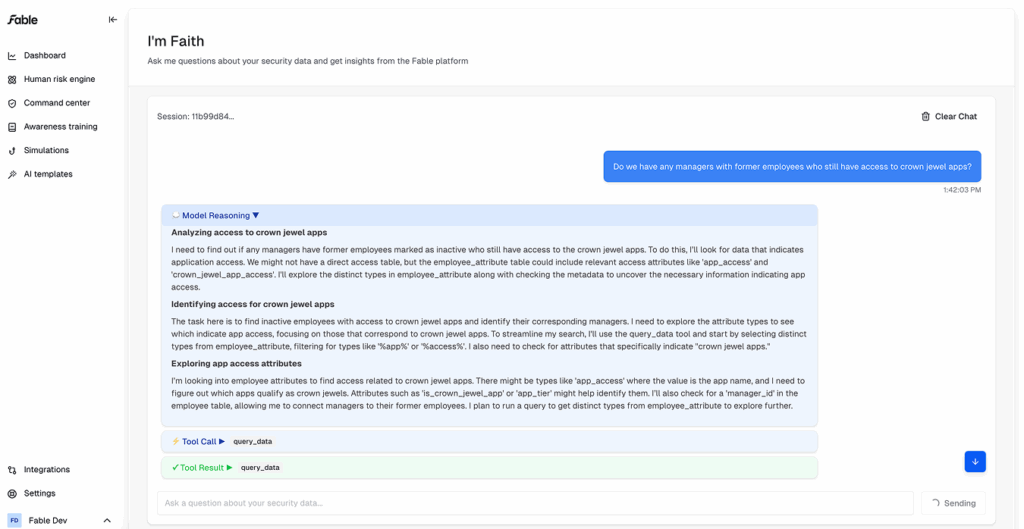
5. Query human risk in plain language

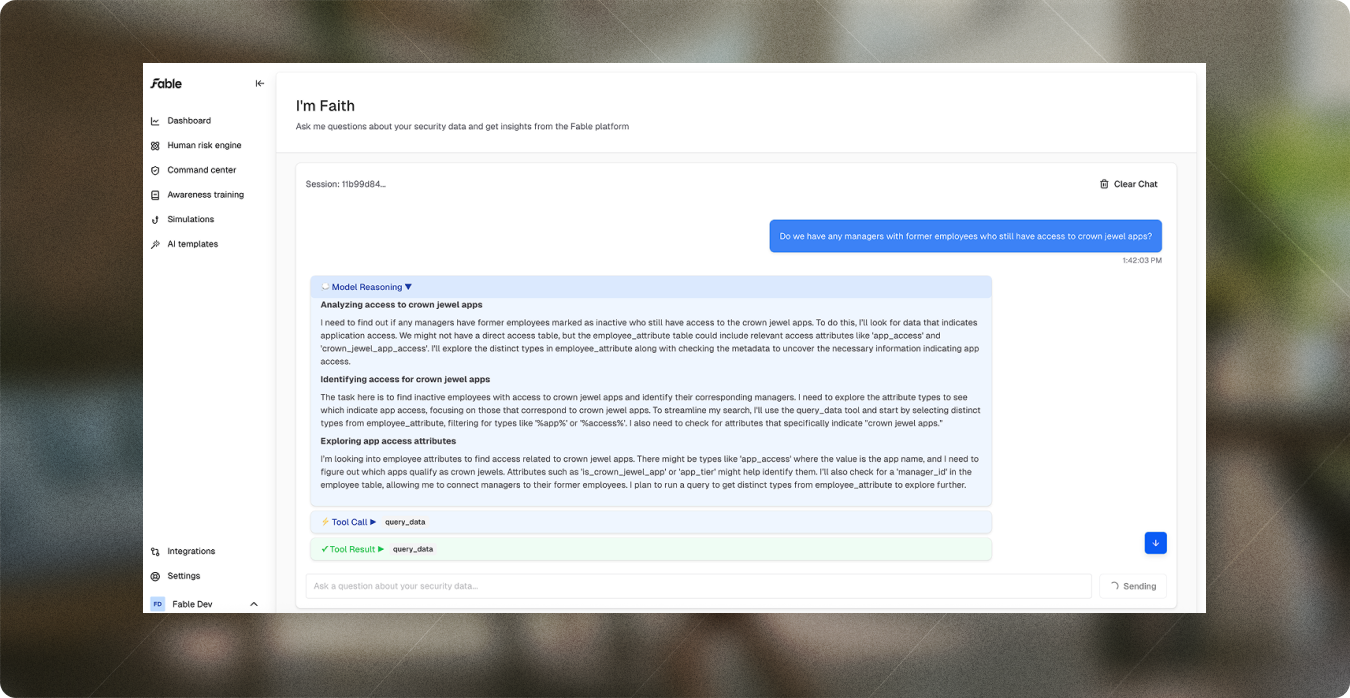
Instead of digging through dashboards, security teams can now ask questions like “Has anyone shared credentials to access our financial data?,” or “Which developers consistently commit secrets or credentials in code?” With generative AI layered on top of a data lakehouse, raw data becomes explainable, queryable, and—most of all—accurate. Having data in both raw and normalized, flattened formats facilitates efficient querying and ensures accuracy, since every result can be traced back to its original source.

6. Turn policy documents into enforcement engines

Most organizations have PDF security policies that nobody reads. With a data lakehouse and generative AI, you can ingest and translate those documents into structured logic—then run that logic against real behavior data to detect violations and deliver interventions. Think of it as policy enforcement without the manual work.

7. Power automated, cross-system remediation

The best part of having a data lakehouse? You don’t just identify risk—you reduce it. We’re evolving toward agentic workflows that act on data lakehouse insights, pushing changes across your stack: triggering a Slack message, disabling access, assigning a task, or updating configuration. It’s no longer just, “Tell me what’s wrong,” but, “Let’s fix it.”


Our human behavior data lakehouse isn’t just an architecture choice. It’s a foundation for a more powerful, precise, and proactive approach to managing human risk. And these seven use cases are just the beginning.

Register for our webinar

Want to learn more about our human behavior data lakehouse? Sign up for our 15-minute webinar on September 4 at 10:00 am PT.